This content has been automatically translated from Ukrainian.
Imagine that your computer is a city. In this city, there are roads along which data travels, buildings where components live, and services that ensure everything works. So, the motherboard is the main avenue of this city. It connects all parts of the system into a single whole and allows them to interact with each other. Let's figure out what a motherboard is, what it consists of, and why it is so important for your computer.
What is a motherboard?
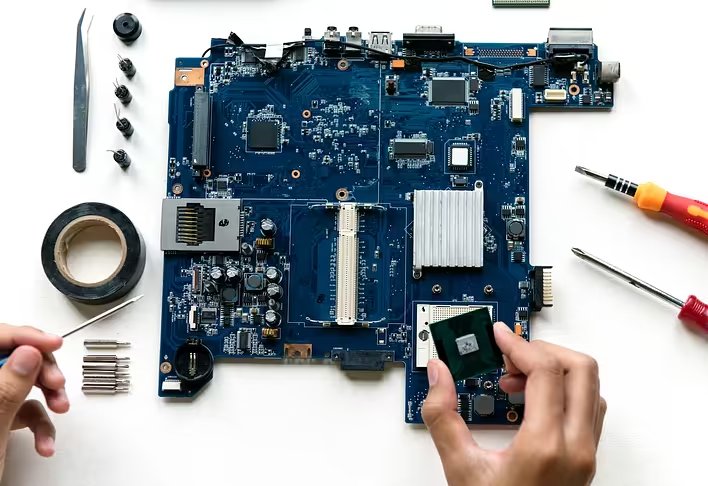
A motherboard (sometimes referred to as a system board) is the main printed circuit board of a computer that serves as the base for all other components. It provides electrical connections between the processor, RAM, hard drives, and other devices. In other words, the motherboard is the “heart” of your computer.
What is on the motherboard?
The motherboard houses various components:
- Central Processing Unit (CPU): This is the “brain” of the computer that performs all calculations.
- Random Access Memory (RAM): Temporary storage for data that the processor is currently using.
- Chipset: A set of chips that manages data flows between the processor and other components.
- Expansion slots: Used to connect additional cards (graphics cards, sound cards, etc.).
- Power connectors: Provide power to all components.
- I/O ports: Serve to connect external devices (USB ports, audio outputs, etc.).
What is the motherboard made of?
The motherboard consists of several important parts:
- Printed circuit board: The main material on which all components are placed.
- Connectors and slots: For connecting other devices and components.
- Chips and resistors: Ensure the functioning of the board.
What is the purpose of the motherboard?
The motherboard performs several key functions:
- Integration of components: It provides communication between all parts of the computer.
- Data flow management: The board coordinates the operation of all components and manages information flows.
- Power distribution: It distributes electrical power among different parts of the system.
Main components of the motherboard
When you look at the motherboard, you can see:
- CPU socket: The place for installing the CPU.
- RAM slots: For the RAM.
- PCIe slots: For connecting graphics cards and other expansion cards.
- SATA ports: For connecting hard drives and SSDs.
What is a system board?
A system board is another name for a motherboard. It performs the same functions and has the same components. This terminological clarification does not change the essence of the device.
Practical tips
If you plan to build a computer yourself or upgrade an existing one, pay attention to the following points:
- Make sure that your motherboard supports the processor and RAM you have chosen.
- Consider the number and type of expansion slots for future upgrades.
- Pay attention to the quality of components and the reputation of the manufacturer.
The motherboard is the true foundation of your computer. It ensures the vitality of all its components. So, if you are going to build a new PC or upgrade an old one, choosing the right motherboard is the first step to success. Remember its importance and choose wisely!